Smart Navigation in Big Visual Studio Solutions
by it support 03. Juni 2014· 2 Min. lesen
When working with big solutions containing lots of projects and files, maybe not perfectly organized, one can lose a lot of time with navigation and searching.
Visual Studio together with Resharper provide many helpers for a fast and painless navigation.
Tool versions used: VS 2012 and R# 7
R# keyboard scheme: Visual Studio Layout
Looking for a type
Let’s say you have a class, interface or another type in mind which you want to find. Or probably you don’t know the exact name but parts of it. The classic approach would be to use the Solution Explorer or the Search functionality and manually locate the File which can be a time consuming action in big solutions. With Go to Type… you’re way faster. It’s like an extended search for types with auto suggest functionality.
Menu: Resharper -> Navigate -> Go to Type
Shortcut: CTRL + T
Now simply start typing the name of the type, which then brings up matching suggestions.
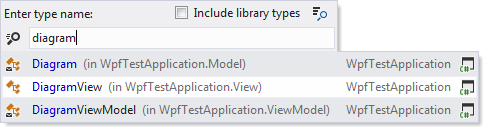
Or if you are looking for a view model but don’t know its exact name:
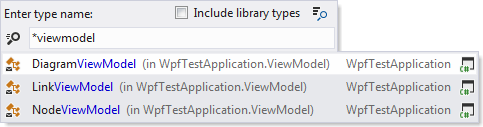
Even just typing the camel case letters is possible.
The other way around
If there is an open file in the editor (e.g. you used the Go to type feature to open a file) and you want to know its location in the Solution Explorer, the Locate feature is very helpful. When triggered the Solution Explorer expands its tree as far as needed, and selects the file in the tree.
Menu: Resharper -> Tools -> Locate in Solution Explorer
Shortcut: SHIFT + Alt + L
Find usages
Finding out about the callers of a specific method or the usage of a type is very comfortable with Find usages. The results of the search are displayed in a nicely arranged tree.
With Find usages advanced… it is also possible to find for example all overriding methods of a method in the base class.
Context-Menu: Right click any type -> Find usages
Shortcut: CTRL-K, R
Go to Implementation
Brings you to the implementation of a type, method, etc. It can also be used to find all the implementations of a method defined in an interface.

Context-Menu: Right click any type -> Go to implementation
Shortcut: CTRL-F12
Hierarchies
If you have complex hierarchies. The hierarchy tree of a type can be easily displayed.

Context-Menu: Right click any type -> Inspect -> Hierarchies
Shortcut: CTRL-E, CTRL-H
Of course there are many more navigation features and this post barely scratches the surface. But the introduced features are the ones which I find the most helpful and which I use a lot when dealing with bigger solutions.
Schreiben Sie einen Kommentar