Airflow 3 SSO with Azure Entra ID
Introduction
If you already have Apache Airflow running and want to stop managing local users and passwords, Azure Entra ID (formerly Azure Active Directory) SSO is a natural next step. It centralises authentication, lets you control access through familiar Entra ID app roles, and removes the need for shared credentials entirely.
In this post we walk through integrating Apache Airflow 3 with Azure Entra ID using the FAB auth manager and an Azure App Registration. By the end, logging into Airflow will look exactly like any other Microsoft 365 sign-in — and the user’s Airflow role will be driven automatically by the role assigned in Entra ID.
Prerequisites
Before getting started, make sure you have the following:
- uv — fast Python package and virtual environment manager. Install from docs.astral.sh/uv.
- Azure CLI — used to create and configure the App Registration. Install from Microsoft Learn.
- An Azure tenant where you have permission to create App Registrations. A sandbox or personal tenant works fine.
You do not need to install Python or Airflow globally — uv handles everything inside a virtual environment.
Disclaimer
⚠️ Development Use Only — The scripts and configuration in this post are intentionally simplified for local development and demonstration purposes. They are not hardened for production. Do not use them as-is in a production environment.
The Three Files
The entire setup consists of three files. Expand each one below to read the full source, or continue to the walkthrough for a detailed explanation of what each does.
scripts/app_registration.sh
#!/usr/bin/env bash
APP_NAME="airflow-sso"

set -euo pipefail

echo "▶ Creating app registration…"
APP_ID=$(az ad app create \
  --display-name "$APP_NAME" \
  --web-redirect-uris "http://localhost/auth/oauth-authorized/azure" \
  --query appId -o tsv)
echo "✓ App created: $APP_ID"

echo "▶ Generating app role IDs…"
ADMIN_ID=$(uuidgen)
OP_ID=$(uuidgen)
PUBLIC_ID=$(uuidgen)
USER_ID=$(uuidgen)
VIEW_ID=$(uuidgen)
echo "✓ Role IDs generated"

echo "▶ Updating app with roles…"
APP_ROLES="[
  {\"id\": \"$ADMIN_ID\", \"displayName\": \"Airflow Admin\", \"description\": \"Airflow Admin\", \"value\": \"admin\", \"allowedMemberTypes\": [\"User\"]},
  {\"id\": \"$OP_ID\", \"displayName\": \"Airflow Operator\", \"description\": \"Airflow Operator\", \"value\": \"op\", \"allowedMemberTypes\": [\"User\"]},
  {\"id\": \"$PUBLIC_ID\", \"displayName\": \"Airflow Public\", \"description\": \"Airflow Public\", \"value\": \"public\", \"allowedMemberTypes\": [\"User\"]},
  {\"id\": \"$USER_ID\", \"displayName\": \"Airflow User\", \"description\": \"Airflow User\", \"value\": \"user\", \"allowedMemberTypes\": [\"User\"]},
  {\"id\": \"$VIEW_ID\", \"displayName\": \"Airflow Viewer\", \"description\": \"Airflow Viewer\", \"value\": \"viewer\", \"allowedMemberTypes\": [\"User\"]}
]"
az ad app update --id "$APP_ID" --app-roles "$APP_ROLES"
echo "✓ App roles created"

echo "▶ Creating service principal (Enterprise App)…"
SP_ID=$(az ad sp create --id "$APP_ID" --query id -o tsv)
echo "✓ Service principal created: $SP_ID"

echo "▶ Assigning Admin role to current user…"
MY_USER_ID=$(az ad signed-in-user show --query id -o tsv)
az rest \
  --method POST \
  --uri "https://graph.microsoft.com/v1.0/users/$MY_USER_ID/appRoleAssignments" \
  --body "{
    \"principalId\": \"$MY_USER_ID\",
    \"resourceId\": \"$SP_ID\",
    \"appRoleId\": \"$ADMIN_ID\"
  }" >/dev/null
echo "✓ Role assignment done"

echo "▶ Creating client secret and writing .env…"
az ad app credential reset --id "$APP_ID" --display-name "my-secret" \
  --query '{CLIENT_SECRET:password,CLIENT_ID:appId,TENANT_ID:tenant}' -o tsv \
  | awk 'BEGIN{FS="\t"} {print "CLIENT_SECRET="$1"\nCLIENT_ID="$2"\nTENANT_ID="$3}' \
  > .env
echo "✓ .env written"

echo "✔ Completed"
resources/webserver_config.py
import os
from flask_appbuilder.const import AUTH_OAUTH
from dotenv import load_dotenv


# Load environment variables from .env file
load_dotenv(".env")
TENANT_ID = os.environ["TENANT_ID"]
CLIENT_ID = os.environ["CLIENT_ID"]
CLIENT_SECRET = os.environ["CLIENT_SECRET"]

# Flask-WTF flag for CSRF
WTF_CSRF_ENABLED = True
WTF_CSRF_TIME_LIMIT = None

# ----------------------------------------------------
# AUTHENTICATION CONFIG (specific to FAB auth manager)
# ----------------------------------------------------
AUTH_TYPE = AUTH_OAUTH

# Will allow user self registration
AUTH_USER_REGISTRATION = True
AUTH_ROLES_SYNC_AT_LOGIN = True
AUTH_ROLES_MAPPING = {
    "admin": ["Admin"],
    "op": ["Op"],
    "public": ["Public"],
    "user": ["User"],
    "viewer": ["Viewer"],
}

OAUTH_PROVIDERS = [
    {
        "name": "azure",
        "token_key": "access_token",
        "icon": "fa-windows",
        "remote_app": {
            "api_base_url": f"https://login.microsoftonline.com/{TENANT_ID}/oauth2/v2.0/",
            "client_kwargs": {
                "scope": "email profile openid",
                "prompt": "select_account",
            },
            "access_token_url": f"https://login.microsoftonline.com/{TENANT_ID}/oauth2/v2.0/token",
            "authorize_url": f"https://login.microsoftonline.com/{TENANT_ID}/oauth2/v2.0/authorize",
            "request_token_url": None,
            "client_id": CLIENT_ID,
            "client_secret": CLIENT_SECRET,
            "jwks_uri": "https://login.microsoftonline.com/common/discovery/v2.0/keys",
        },
    }
]
scripts/airflow_sso.sh
#!/usr/bin/env bash
set -euo pipefail

echo "▶ Installing Airflow…"
AIRFLOW_VERSION=3.1.8
PYTHON_VERSION="$(python -c 'import sys; print(f"{sys.version_info.major}.{sys.version_info.minor}")')"
CONSTRAINT_URL="https://raw.githubusercontent.com/apache/airflow/constraints-${AIRFLOW_VERSION}/constraints-${PYTHON_VERSION}.txt"
uv pip install "apache-airflow==${AIRFLOW_VERSION}" --constraint "${CONSTRAINT_URL}"
echo "✓ Airflow installed (${AIRFLOW_VERSION})"

echo "▶ Installing providers…"
uv pip install apache-airflow-providers-fab --constraint "${CONSTRAINT_URL}"
uv pip install authlib --constraint "${CONSTRAINT_URL}"
echo "✓ Providers installed"

echo "▶ Configuring Airflow (FAB auth)…"
export AIRFLOW_HOME="$PWD/airflow"
export AIRFLOW__CORE__AUTH_MANAGER="airflow.providers.fab.auth_manager.fab_auth_manager.FabAuthManager"
export AIRFLOW__FAB__CONFIG_FILE="$PWD/resources/webserver_config.py"
airflow db migrate
echo "✓ Airflow database migrated"

echo "▶ Starting Airflow API server…"
airflow api-server --port 8081
Walkthrough
Step 1 — App Registration (app_registration.sh)
The first script creates and configures everything on the Azure side using the Azure CLI.
Creating the App Registration
The script starts by creating an App Registration named airflow-sso with a redirect URI of http://localhost/auth/oauth-authorized/azure. This is the callback path that Flask-AppBuilder expects when an OAuth flow completes.
Defining App Roles
Rather than relying on Entra ID groups, this setup uses App Roles — a feature that lets you define custom roles directly on the App Registration and assign them to users. The script defines five roles whose value fields match the Airflow role names exactly:
admin→ Airflow Adminop→ Airflow Operatorpublic→ Airflow Publicuser→ Airflow Userviewer→ Airflow Viewer
Each role gets a fresh UUID generated by uuidgen, as required by the Microsoft Graph API.
Service Principal and Role Assignment
An App Registration on its own is just a definition. The script also creates a Service Principal — the Enterprise App entry visible in the Entra ID portal — and immediately assigns the admin role to the currently logged-in Azure CLI user. This means you can log in with Admin rights straight away without any manual steps in the Azure portal.
Writing the .env file
Finally, the script resets the app credentials and pipes the output through awk to produce a ready-to-use .env file:
CLIENT_SECRET=<generated>
CLIENT_ID=<app-id>
TENANT_ID=<tenant-id>
This file is consumed by webserver_config.py at startup.
Step 2 — Webserver Config (webserver_config.py)
This file replaces Airflow’s default webserver_config.py and acts as the bridge between Entra ID and Airflow’s permission system.
Loading credentials
python-dotenv loads the .env file written in Step 1, making TENANT_ID, CLIENT_ID, and CLIENT_SECRET available as environment variables.
Switching to OAuth
Setting AUTH_TYPE = AUTH_OAUTH tells Flask-AppBuilder to use OAuth instead of its built-in database authentication. Two additional flags make role management fully automatic:
AUTH_USER_REGISTRATION = True— any user who successfully authenticates via Entra ID is automatically registered in Airflow’s user database on first login. No manual user creation is needed.AUTH_ROLES_SYNC_AT_LOGIN = True— the user’s Airflow roles are re-evaluated on every login based on their current Entra ID role assignments. Changes in Entra ID take effect on the next sign-in.
Role mapping
AUTH_ROLES_MAPPING is the key that connects the two systems. The dictionary keys are the value fields of the Entra ID App Roles (exactly as defined in app_registration.sh), and the values are the target Airflow roles:
AUTH_ROLES_MAPPING = {
    "admin": ["Admin"],
    "op": ["Op"],
    "public": ["Public"],
    "user": ["User"],
    "viewer": ["Viewer"],
}
OAuth provider configuration
The OAUTH_PROVIDERS list configures Flask-AppBuilder’s OAuth client for Azure. All tenant-specific URLs are constructed from TENANT_ID at import time. The scope is set to email profile openid — the minimum required for FAB to identify the user and extract their app role claims from the token. The prompt: select_account option forces the Azure login page to always show the account picker, which is handy in a multi-account setup.
Step 3 — Airflow SSO Setup (airflow_sso.sh)
The final script installs Airflow and wires everything together.
Installing Airflow and providers
Airflow 3.1.8 is installed using uv pip install with the official constraints file, pinned to the detected Python version. Two additional packages are required:
apache-airflow-providers-fab— provides the FAB auth manager, which is no longer bundled with Airflow core in version 3.authlib— the OAuth client library that Flask-AppBuilder delegates to for the actual OAuth token exchange.
Configuring the auth manager
Three environment variables tell Airflow where to find its authentication layer:
AIRFLOW_HOME=$PWD/airflow
AIRFLOW__CORE__AUTH_MANAGER=airflow.providers.fab.auth_manager.fab_auth_manager.FabAuthManager
AIRFLOW__FAB__CONFIG_FILE=$PWD/resources/webserver_config.py
AIRFLOW__CORE__AUTH_MANAGER explicitly selects the FAB auth manager — Airflow 3 ships with a new pluggable auth manager architecture and no longer defaults to FAB. AIRFLOW__FAB__CONFIG_FILE points to the webserver_config.py written in Step 2.
Database migration and startup
airflow db migrate initialises the metadata database (SQLite by default for local development). Once that completes, the API server starts on port 8081.
Putting It All Together
With the three files in place, the full setup from a fresh clone is five commands:
uv venv
source .venv/bin/activate
az login --tenant <your-tenant-id> --allow-no-subscriptions
./scripts/app_registration.sh
./scripts/airflow_sso.sh
app_registration.sh must run before airflow_sso.sh because it generates the .env file that webserver_config.py reads at startup.
Seeing It in Action
- Open http://localhost:8081 — instead of a username and password form, you will see a Sign in with Azure button.
- Clicking it redirects to the Microsoft login page. On first use in the tenant, Azure shows a consent screen listing the requested permissions — click Accept.
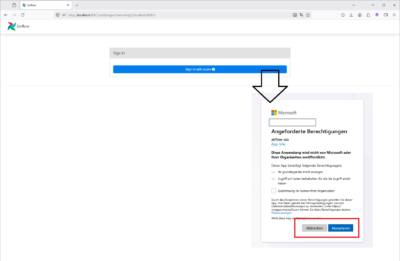
- After accepting, you are redirected back to Airflow and logged in automatically. Because
AUTH_USER_REGISTRATIONis enabled, your account is created on first login without any manual step. - Navigate to Security → List Users to verify the role mapping: your account should be listed with the Admin role, exactly as assigned in Entra ID by
app_registration.sh. 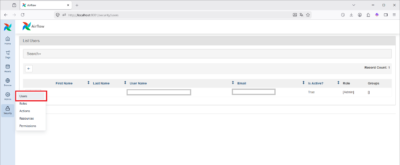
Conclusion
With around 80 lines of shell and Python, Apache Airflow 3 can be fully integrated with Azure Entra ID SSO. The result is:
- A single sign-on experience backed by your organisation’s Microsoft accounts
- Automatic user registration on first login — no manual user management in Airflow
- Role management through Entra ID App Roles — assign or revoke access from the Azure portal
- Role changes that take effect on the user’s next login, thanks to
AUTH_ROLES_SYNC_AT_LOGIN
From here, the natural next steps for a more robust setup are to replace the SQLite metadata database with PostgreSQL, put the API server behind a reverse proxy with HTTPS, restrict user assignment to the Enterprise App so only explicitly assigned users can log in, and rotate or manage client secrets through a secrets manager rather than a plain .env file.
References
- https://airflow.apache.org/docs/apache-airflow/3.1.8/start.html
- https://airflow.apache.org/docs/apache-airflow-providers-fab/stable/index.html
- https://airflow.apache.org/docs/apache-airflow-providers-fab/stable/auth-manager/sso.html
- https://github.com/apache/airflow/blob/3.1.8/airflow-core/src/airflow/config_templates/default_webserver_config.py
- https://learn.microsoft.com/en-us/cli/azure/install-azure-cli-linux?pivots=script
- https://docs.astral.sh/uv/getting-started/installation
Schreiben Sie einen Kommentar